Desktop app
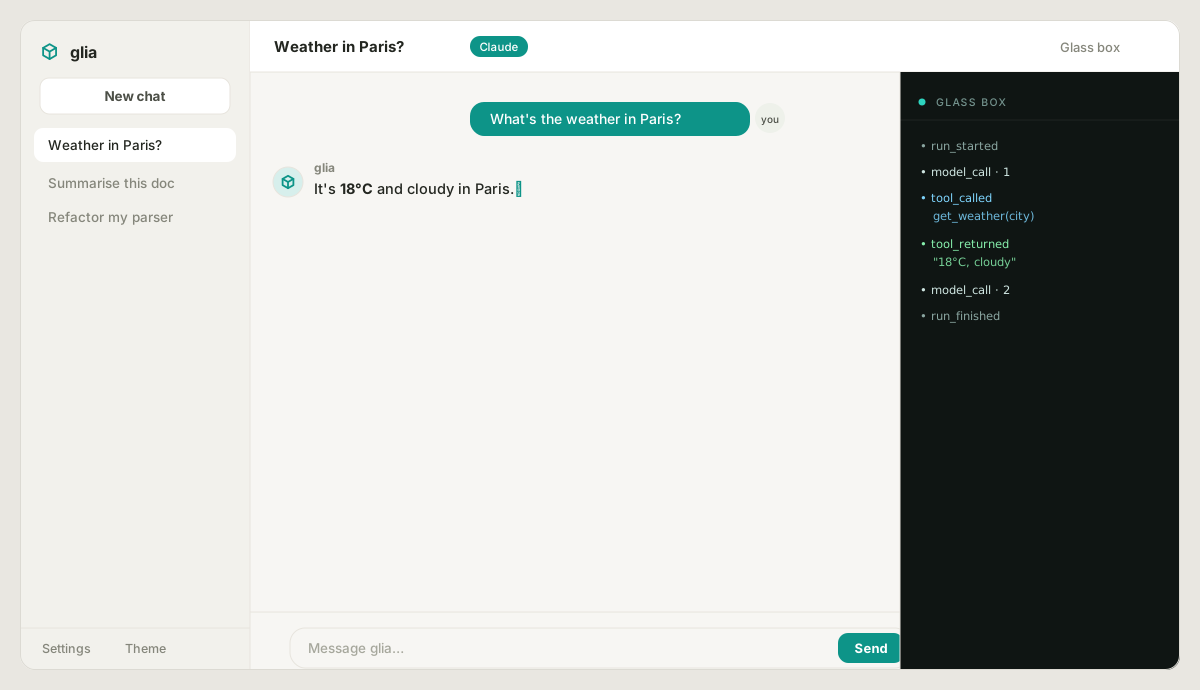
glia ships a small graphical shell — a chat window that also shows the live
glass box (streaming tokens, tool calls, approvals) as it happens. It runs a real
glia.Agent under the hood, so it doubles as a demo of the library.
Two ways to get it
1. Download a binary (no Python needed)
Grab the standalone build for your OS from the latest release:
glia-shell-windows.exeglia-shell-macosglia-shell-linux
Double-click it (or run it from a terminal). It starts a local server and opens the app in your browser. Nothing is uploaded anywhere — everything runs on your machine.
2. Install from PyPI (native window)
Installed this way, the app opens in a native desktop window (via pywebview),
falling back to your browser if a window backend isn't available. Use
glia-shell --web to force browser mode.
Using it
- Conversations are saved. The sidebar keeps your chat history (stored as glia trajectory checkpoints in your config directory), so it survives restarts — start new chats, switch between them, or delete them.
- Replies render as Markdown — bold, lists, links, and code blocks with copy buttons. Pick a light/dark theme from the sidebar.
- Works offline out of the box. In demo mode it echoes your messages back, so you can try the interface and watch the event stream with zero setup.
- Run a local model — free. In Settings, choose Ollama, set the model
(e.g.
qwen2.5ordeepseek-r1) and host, and save. With Ollama installed and the model pulled (ollama pull qwen2.5), everything runs locally on your machine — no key, no network. - Add a key for real Claude. Open Settings, choose Claude, paste your
Anthropic API key (it's stored locally in your config directory and never sent
back to the UI), pick a model, and save. Now messages go to Claude, and the two
demo tools (
current_time,word_count) show up in the glass box when used. - The glass box on the right lists every event exactly as the library emits
it —
model_call,model_delta,tool_called,tool_returned,approval_resolved,run_finished. Toggle it with the Glass box button. - New chat starts a fresh conversation; Quit stops the local server.
How it's built
The shell is deliberately thin and dependency-light:
- The server is pure Python standard library (
http.server) — no web framework. Chat replies stream over Server-Sent Events. - The UI is a single self-contained HTML file (no build step).
- The only optional dependency is
pywebview, and only for the native window; the downloadable binaries run in browser mode with zero third-party deps.
In other words, the app is itself a glass box — you can read all of it under
glia/shell/.